
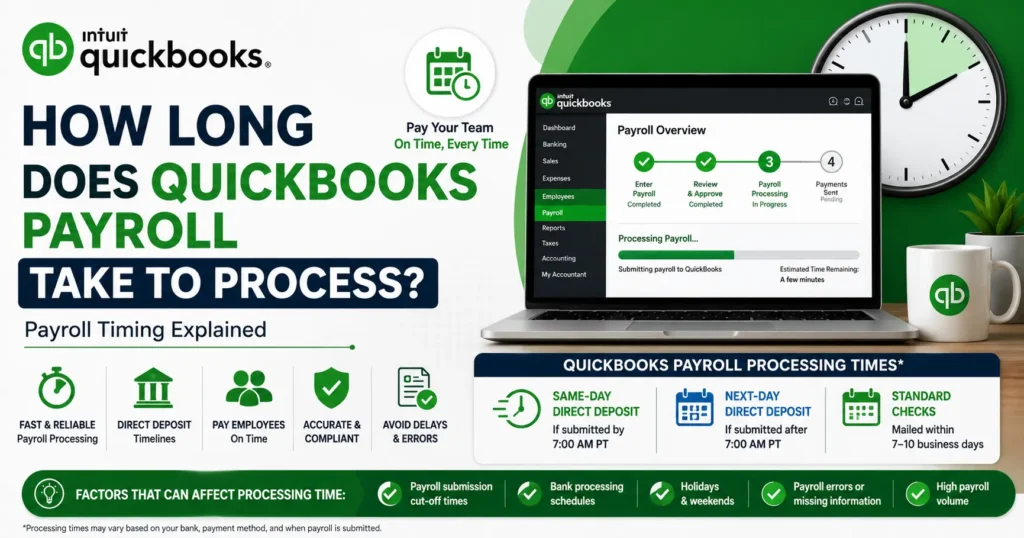
QuickBooks Payroll direct deposits are processed within one to two business days. But the correct time can vary depending on the payroll plan you use, your account status, banking procedures, and when payroll is submitted.
Some users may be eligible for same-day direct deposit, whereas others may experience longer processing times. It takes longer processing time if their account is new or if it is under review
QuickBooks Payroll Processing
When payroll is submitted through QuickBooks, the software transfers money from one account to another. These steps include:
- Calculating employee wages
- Processing deductions and benefits
- Calculating payroll taxes
- Verifying payroll information
- Communicating with banking institutions
Same-Day Direct Deposit
QuickBooks provides same-day direct deposit for eligible users on certain payroll plans.
This option is useful for businesses that need flexibility at the time of running payroll
How Same-Day Direct Deposit Works
To qualify for same-day processing:
- The business must be eligible for the service.
- Payroll must be submitted before the daily cutoff time.
- The payroll account must meet QuickBooks requirements.
Next-Day Direct Deposit
Many QuickBooks Payroll users have access to next-day direct deposit.
This means employees receive their pay on the following business day after payroll is submitted.
Benefits of Next-Day Payroll
Next-day processing offers several advantages:
- Faster employee payments
- Reduced payroll planning pressure
- More flexibility when handling last -minute payroll adjustments
Standard Payroll Processing Time
For some users, payroll processing may take between two and five business days.
This longer processing period is most common for:
- New payroll accounts
- Recently activated payroll subscriptions
- Certain contractor payment transactions
- Accounts undergoing verification reviews
How Long Does Payroll Calculation Take?
The actual payroll calculation process is very fast.
For most small businesses, payroll calculations are completed within a few minutes.
However, larger organizations with many employees may require additional processing time due to:
- Multiple pay rates
- Overtime calculations
- Benefits deductions
- Tax calculations
- Contractor payments
Factors That Affect Payroll Processing Time
Payroll Submission Time
If payroll is submitted before the cut-off:
- Processing begins on the same business day.
If payroll is submitted after the cut-off:
- Processing usually starts on the next business day.
Weekends and Holidays
Banks do not process direct deposits on weekends or most federal holidays.
As a result, payroll submitted near these dates may take longer to reach employee accounts.
For example:
- Payroll submitted on Friday evening may not begin processing until Monday.
- Payroll submitted before a holiday may require extra business days for completion.
New Account Verification
When a business first signs up for payroll services, QuickBooks may verify:
- Business information
- Banking details
- Payroll history
During this period, payroll processing may take up to five business days.
Once the account is fully verified, processing times often become much faster.
Bank Processing Policies
Even after QuickBooks completes payroll processing, individual banks may have their own deposit schedules.
Some banks post direct deposits immediately, while others may take additional time to make funds available.
Because of these differences, employees may receive deposits at different times depending on their financial institution.
Tips to Avoid Payroll Delays
Submit Payroll Early
If the payment is submitted early, it gives additional time for processing and helps in preventing last-minute issues.
Verify Employee Banking Information
Incorrect bank account details can delay direct deposits and require payroll corrections.
Review employee information regularly for accuracy.
Keep Payroll Information Updated
Outdated company records, tax information, or banking details can create processing delays.
Monitor Holiday Schedules
Plan payroll submissions around weekends and holidays so that employees receive payments on time.
What to Do If Payroll Is Delayed
If payroll takes longer than expected, review the following:
- Payroll submission date
- Direct deposit processing status
- Employee banking information
- Account verification status
- notifications from QuickBooks
You should also check whether the weekend holidays have affected processing.
If the delay continues beyond the expectation, contact QuickBooks Payroll Support