
Introduction
QuickBooks is one of the most trusted accounting solutions for businesses of all sizes. Whether you use QuickBooks Online, QuickBooks Desktop Plus, Enterprise, Payroll, Payments, or Time Tracking services, keeping your subscription active is essential for uninterrupted business operations.
Many users encounter challenges during the QuickBooks subscription renewal process. Common issues include expired payment methods, billing errors, failed automatic renewals, account verification problems, service interruptions, and unexpected subscription cancellations. These issues can affect payroll processing, bank feeds, invoicing, reporting, tax calculations, and access to company data.
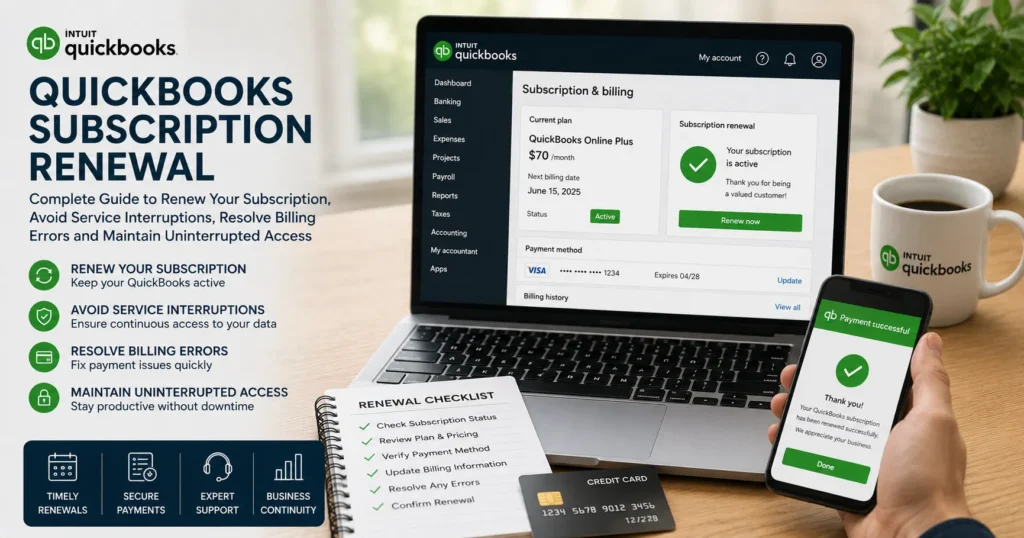
This comprehensive guide explains everything you need to know about QuickBooks subscription renewal, including how subscriptions work, common renewal problems, troubleshooting methods, billing management, and best practices for avoiding service disruptions.
What Is a QuickBooks Subscription?
A QuickBooks subscription is a recurring service plan that grants access to QuickBooks products and features.
Depending on the product, subscriptions may include:
- Accounting tools
- Payroll services
- Bank feeds
- Payment processing
- Tax calculations
- Cloud backups
- Inventory management
- Multi-user access
- Technical support
- Security updates
Subscriptions can be billed monthly or annually depending on the selected plan.
Why Subscription Renewal Is Important
Failing to renew a QuickBooks subscription can lead to several issues:
Loss of Access
Users may lose access to:
- Company files
- Financial reports
- Payroll features
- Tax forms
- Bank synchronization
Service Interruptions
Expired subscriptions may stop:
- Automatic bank feeds
- Payment processing
- Payroll tax calculations
- Direct deposit services
Security Risks
Renewed subscriptions ensure access to:
- Security patches
- Software updates
- Bug fixes
- Compliance updates
Regulatory Compliance
Tax laws and payroll regulations frequently change. Active subscriptions help businesses remain compliant.
Common QuickBooks Subscription Renewal Issues
Many users experience errors while renewing subscriptions.
Common issues include:
Payment Method Expired
Credit cards often expire before renewal dates.
Symptoms:
- Renewal declined
- Subscription suspended
- Failed payment notifications
Incorrect Billing Information
Errors in billing details may prevent successful transactions.
Examples:
- Wrong ZIP code
- Incorrect card number
- Invalid CVV code
Bank Authorization Problems
Banks may block transactions due to:
- Fraud protection
- International charges
- Spending limits
Subscription Not Renewing Automatically
Automatic renewal can fail because of:
- Card expiration
- Account restrictions
- Insufficient funds
Duplicate Accounts
Businesses managing multiple QuickBooks accounts may accidentally renew the wrong subscription.
Payroll Subscription Issues
Payroll services sometimes fail to renew even when the QuickBooks subscription remains active.
Signs Your Subscription Needs Renewal
Watch for these warning messages:
- Subscription expired
- Renewal required
- Billing information needs updating
- Service disabled
- Payment failed
- Subscription inactive
- Payroll service unavailable
Other indicators include:
- Bank feeds stop updating
- Payroll updates fail
- Direct deposit becomes unavailable
- Customer payments cannot process
How QuickBooks Subscription Renewal Works
The renewal process generally follows these steps:
Step 1: Subscription Verification
QuickBooks verifies:
- Account status
- Subscription type
- Payment method
Step 2: Billing Authorization
The payment provider confirms:
- Card validity
- Available funds
- Security authorization
Step 3: Payment Processing
The renewal fee is charged.
Step 4: Account Reactivation
Services remain active or become reactivated.
Step 5: Confirmation Email
Users receive:
- Payment receipt
- Renewal confirmation
- Updated subscription information
How to Check Subscription Status
To verify your subscription:
For QuickBooks Online
- Sign in to QuickBooks Online.
- Open Settings.
- Select Account and Settings.
- Click Billing & Subscription.
Review:
- Renewal date
- Billing frequency
- Payment method
- Subscription status
For QuickBooks Desktop
- Open QuickBooks.
- Go to Help.
- Select Manage My License.
- Review subscription information.
How to Renew QuickBooks Subscription
Method 1: Automatic Renewal
Automatic renewal is the simplest method.
Requirements:
- Valid payment method
- Active account
- Updated billing information
QuickBooks automatically charges the payment method on file.
Method 2: Manual Renewal
Manual renewal may be necessary if automatic renewal fails.
Steps:
- Log into your account.
- Open subscription settings.
- Choose Renew Subscription.
- Confirm payment details.
- Complete payment.
- Verify activation.
How to Update Billing Information
Keeping billing information current prevents renewal failures.
Update:
- Credit card number
- Expiration date
- Billing address
- Contact information
Verify all information before saving changes.
Troubleshooting Subscription Renewal Problems
Solution 1: Verify Payment Information
Check:
- Card number
- Expiration date
- CVV code
- Billing ZIP code
Even small errors may prevent payment processing.
Solution 2: Contact Your Bank
Ask your bank whether:
- The charge was declined
- Fraud protection blocked the transaction
- Spending limits caused the failure
Request authorization if needed.
Solution 3: Try a Different Payment Method
Use an alternative:
- Credit card
- Debit card
- Bank account
This often resolves payment authorization issues.
Solution 4: Clear Browser Cache
For QuickBooks Online:
- Clear cache.
- Remove cookies.
- Restart browser.
- Sign in again.
Corrupted browser data may interfere with billing pages.
Solution 5: Use Private Browsing Mode
Private browsing helps eliminate:
- Cached credentials
- Session conflicts
- Browser extension interference
Solution 6: Check Subscription Ownership
Ensure you are logged into the account that owns the subscription.
Many businesses have multiple Intuit accounts.
Payroll Subscription Renewal Issues
Payroll users frequently experience separate renewal problems.
Common causes include:
- Payroll service expired
- Subscription mismatch
- License validation failure
Effects:
- Payroll updates stop
- Tax tables become unavailable
- Direct deposit services fail
Verify payroll subscription status independently from QuickBooks.
QuickBooks Desktop Subscription Renewal Issues
Desktop users may encounter:
License Validation Errors
QuickBooks cannot validate the subscription.
Activation Problems
The software requests repeated activation.
Subscription Verification Failure
QuickBooks cannot communicate with licensing servers.
Update Service Errors
Software updates may stop working.
Solutions often involve:
- Updating QuickBooks
- Verifying internet connectivity
- Refreshing license information
QuickBooks Online Subscription Problems
QuickBooks Online users may experience:
Renewal Not Processing
Payments remain pending.
Billing Portal Errors
Subscription pages fail to load.
Service Suspension
Access becomes limited after payment failure.
Banking Features Disabled
Connected bank accounts stop syncing.
How Subscription Expiration Affects Payroll
Payroll services depend on active subscriptions.
Possible consequences include:
- Payroll processing failure
- Tax table update failure
- W-2 generation issues
- Direct deposit suspension
- Employee payment delays
Businesses should renew subscriptions before expiration dates.
How Subscription Expiration Affects Payments
QuickBooks Payments services may stop functioning.
Potential issues include:
- Payment processing failures
- Invoice payment problems
- Merchant account restrictions
- Delayed customer transactions
Maintaining active subscriptions helps avoid revenue interruptions.
How Subscription Expiration Affects Bank Feeds
Banking services may become unavailable.
Users may experience:
- Missing transactions
- Sync failures
- Connection errors
- Account update problems
Renewing the subscription restores most banking functions.
Best Practices for Subscription Management
Enable Automatic Renewal
Automatic renewal reduces interruption risks.
Monitor Renewal Dates
Track:
- Expiration dates
- Billing cycles
- Payment schedules
Update Payment Methods Early
Avoid waiting until cards expire.
Verify Billing Emails
Ensure billing notifications reach the correct email address.
Maintain Backup Payment Methods
Secondary payment methods reduce renewal failures.
Security Considerations During Renewal
Protect your account by:
- Using strong passwords
- Enabling multi-factor authentication
- Monitoring account activity
- Verifying payment requests
Never provide billing information through suspicious emails.
Preventing Future Renewal Problems
Follow these recommendations:
Schedule Renewal Reviews
Review subscription details quarterly.
Keep Contact Information Updated
Ensure billing reminders reach you.
Monitor Bank Statements
Identify failed charges quickly.
Save Renewal Confirmations
Store receipts and renewal emails for reference.
Maintain Administrative Access
Verify that key personnel can manage subscriptions.
Frequently Asked Questions
Why did my QuickBooks subscription not renew automatically?
Automatic renewals typically fail due to expired cards, insufficient funds, billing errors, or bank authorization issues.
Can I use QuickBooks after my subscription expires?
Access may become limited depending on the product. Certain features and services may stop functioning until renewal is completed.
How long do I have before service interruption occurs?
Service interruption timing varies by subscription type and product plan.
Will my company data be deleted if I don’t renew?
Generally, data is retained for a period, but access restrictions may apply.
Can I change my subscription plan during renewal?
Yes. Many users upgrade or downgrade plans during the renewal process.
What happens if my payroll subscription expires?
Payroll features, tax updates, direct deposits, and payroll processing may stop until the subscription is renewed.
Conclusion
QuickBooks subscription renewal is a critical part of maintaining uninterrupted access to accounting, payroll, banking, reporting, and payment processing services. While most renewals occur automatically, issues such as expired payment methods, billing errors, bank authorization failures, and account verification problems can disrupt business operations.
By monitoring renewal dates, keeping billing information updated, enabling automatic payments, and addressing subscription warnings promptly, businesses can minimize downtime and maintain continuous access to essential QuickBooks services. Proper subscription management not only prevents service interruptions but also ensures access to the latest security updates, compliance changes, and productivity-enhancing features that keep financial operations running smoothly.